How to Get Award Verification Number (AVN) NACTVET
National Council for Technical and Vocational Education and Training (NACTVET). The National Council for Technical and Vocational Education and Training (NACTVET) is a corporate body established pursuant to NACTVET Act, Cap. 129, to coordinate and regulate the provision of technical and vocational education and training.
WHAT IS AVN?
Award Verification Number (AVN) is a unique identification number issued by the National Council for Technical and Vocational Education and Training (NACTVET) to holders of NTA Level 6 (Ordinary Diploma) and equivalent qualifications.
The AVN verifies that your qualification is authentic and is commonly required when applying for admission to bachelor’s degree programmes in Tanzania. It also allows universities and other institutions to verify your academic credentials electronically.
An Award Verification Number is a unique identity assigned to holders of NTA Level 6 (Diploma) and equivalent qualifications. It confirms that an award is valid and recognised by NACTVET.
Who can use this system?
- Diploma graduates applying for Bachelor programmes
- Higher Learning Institutions verifying applicants
- Authorised NACTVET officers and institution users
WHAT YOU SHOULD CONSIDER BERE APPLYING?
Before you start:
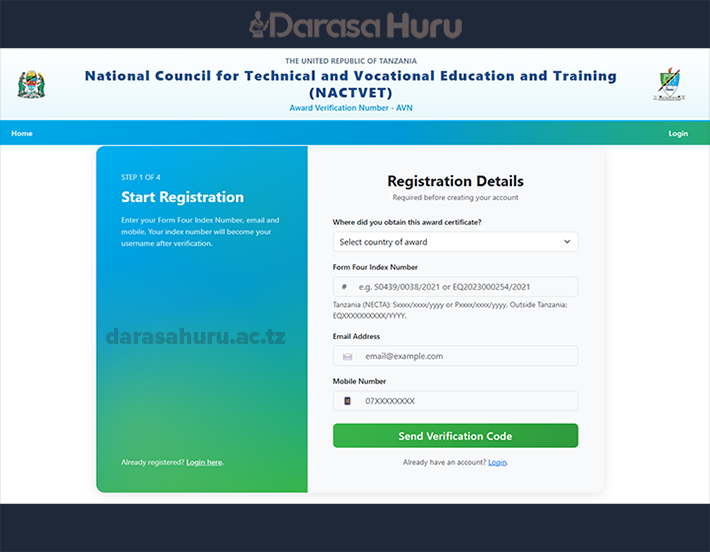
- A valid working email address
- A valid mobile phone number
- A valid certificate / award details
User instructions
New applicants should start with Register (email & mobile verification first). If you already have an account, use Login.
1. Apply for or update your AVN
- Click Login if you are an authorised applicant / institution user.
- Enter your registered username and password.
- Complete or update your personal and award information as required.
- Submit the application and wait for processing / confirmation.
- Keep your AVN and application reference for Higher Learning Institution applications.
2. Verify an existing award (AVN)
- Obtain the full Award Verification Number from the certificate / transcript.
- Log in with an authorised verification account (where required).
- Enter the AVN exactly as printed — including letters, numbers and dashes if any.
- Submit the search / verify request.
Review the graduate name, programme, level and institution returned by the system.
3. For Higher Learning Institutions
- Log in using your institution credentials.
- Search applicants by AVN or use the institution panel tools available to your account.
- Confirm that the award details match the student’s application documents.
- Use only verified records for admission decisions.
4. Important notes
- Do not share your password with anyone.
- Use a working email and mobile number so you can receive notifications.
- Provide accurate award details — false information may delay or cancel verification.
- This portal is for official NACTVET AVN services only.
Need help?
Contact NACTVET for support with Award Verification Number applications and verification.
Phone: 0800 110 388 | Email: [email protected]
MODE OF APPLICATION
CLICK HERE TO REGISTER
CLICK HERE TO LOG IN